

Everyone wants their content to rank on page 1 of Google, ideally in the number one position. However, search engine optimization is not getting any easier, quite the opposite. That’s why having a good SEO tool is very important. But achieving better rankings usually requires high-quality content and the right backlinks. Your content needs to be better than that of your competitors.
Of course, you must first conduct proper keyword research so you can rank for the desired keyword. This is exactly where Surfer SEO comes in.
In this blog post, I share my experience with Surfer SEO. You’ll also learn how you can benefit from optimizing your content with Surfer SEO, by analyzing, improving, and ultimately ranking better on Google.
What is Surfer SEO?
Surfer SEO is an AI-powered SEO tool that offers a variety of features. It is designed to simplify the entire process, from keyword research and content structuring to content creation and optimization. Ultimately, the Surfer SEO tool aims to help you achieve better rankings on Google.
Everything starts with your main keyword. Once you enter a specific keyword, the tool guides you step by step through the rest of the process.
What does the on-page SEO tool do?
With Surfer SEO’s on-page SEO tool, the software analyzes your keyword and determines:
- which words should be used in headings
- which words should appear in the content
- how many words are needed to compete with your competitors
The foundation for this analysis is based on Google search results (SERPs). The tool evaluates the top-ranking pages and analyzes factors such as word count, meta tags, and all relevant terms for your content. Typically, the top 10 results are analyzed.
Through this on-page SEO analysis, you gain clear insights into what is important for your content. You can also connect Google Search Console to enhance the data.
Here you can try the tool yourself and gain your own Surfer SEO experience.
Surfer SEO Features: These SEO Tools Are Included
Surfer SEO offers a wide range of features that you can use for analysis and optimization. Similar to tools like KWFinder, Surfer SEO also includes a keyword research tool. With it, you can find relevant search terms along with their search volume.
You also get access to sub-keywords. In addition, there is the SEO Audit Tool. With this tool, you can analyze your existing content and receive recommendations on how to optimize it. For optimization, you can then use the Content Editor in Surfer SEO.
Your optimization progress is measured using the Content Score, which shows how well your article is already optimized. The goal should be a score of 80+. 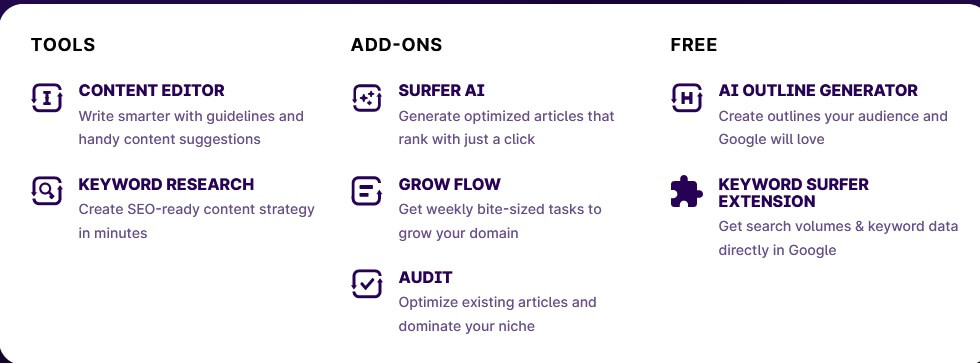
SERP Analyzer: Check if Articles Rank on Google (Perform an Audit)
The SERP Analyzer checks the domains and URLs that rank in the SERPs for your chosen main keyword. You can select which competitors you want to include in your analysis. This feature can save you a lot of time, as it eliminates the need for manual research.
The SERP Analyzer tool from Surfer SEO allows you to perform a complete SEO audit. It analyzes the top 10 search results based on more than 500 ranking factors. Some of the criteria and information you receive include:
- Content length
- Number of headings
- Number of images
- Page load speed
- Keyword density
- Referring URLs and domains
- Meta tags
This analysis of the top 10 results is based directly on Google search data.
Here you can try the tool yourself and gain your own Surfer SEO experience.
After that, a clear step-by-step plan is created for you, so you can implement everything one step at a time. You can see which words you should use and where, receive keyword suggestions, and much more. 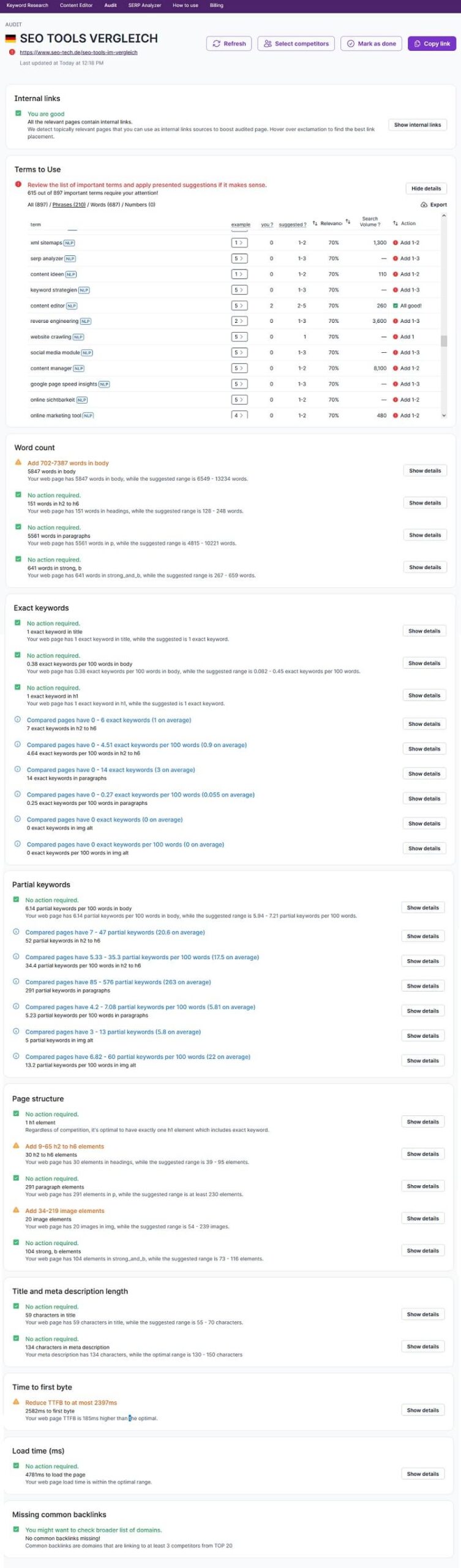
Surfer SEO makes it very easy for you to analyze competitors that already rank well and shows you exactly what you need to do to rank better. Use Surfer SEO for this purpose, it will save you a huge amount of time.
You’ll know exactly which words to add, remove, and where to place them, and more. Everything is data-driven, as the SEO tool analyzes Google search results in real time and provides you with the relevant data. This eliminates guesswork, the analysis is based on solid data.
Here you can try the tool yourself and gain your own Surfer SEO experience.
Surfer SEO Content Editor: Optimize Content and Write the Perfect SEO Text?
The core feature of Surfer SEO is the Surfer Content Editor. It helps you create new content or optimize existing content. It shows you exactly which words still need to be added. 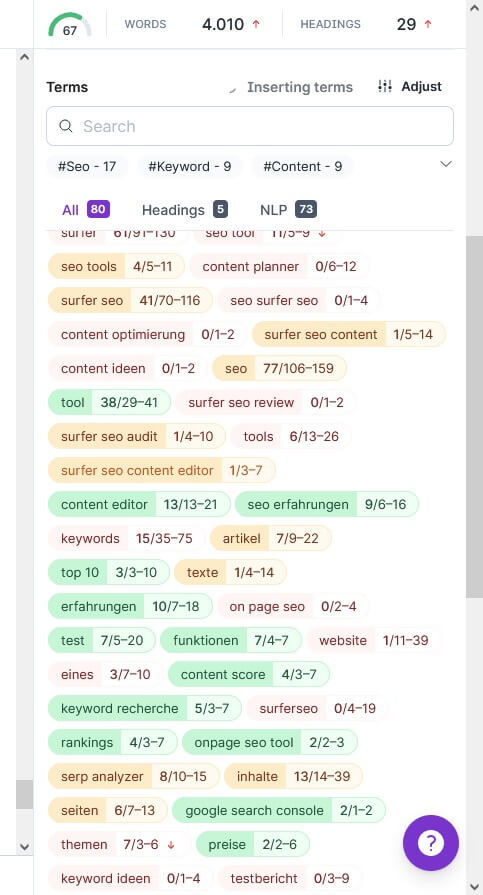
Here, you are not only shown the words you should include, but also the headings, their number, images, and much more. You always have the Content Score in view and receive instant feedback. It’s also practical that, according to Surfer, you can share the tool with an internal team member or copywriter.
This depends on your plan, the higher the plan, the more user access you get for team members and writers. However, it is also possible to use the tool without the user needing their own Surfer SEO account, which is very convenient.
Additional Features
The tool also offers several other features that you can use.
Keyword Research Tool
With the keyword research tool, you can perform a complete keyword analysis. The process is based on your main keyword. 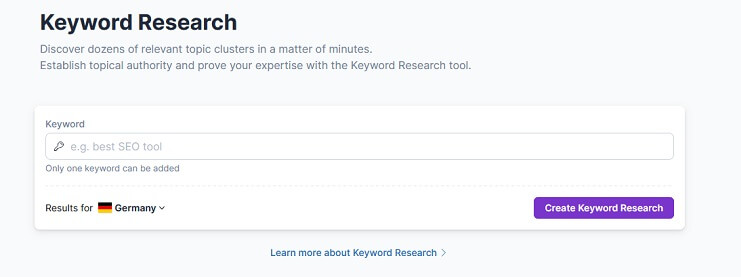
Compared to tools like KWFinder from Mangools or SEMrush, the level of detail here is somewhat lower. This is because you are only shown the search volume, while the SEO difficulty is not displayed here (it can be found elsewhere in the tool). However, the “SERP Similarity” feature is very useful.
It helps you find keywords that are highly similar to your main keyword, allowing you to include them in your content. This makes it easier to rank for multiple related keywords, rather than just a single one, something Surfer SEO does very well.
It is also helpful that the tool suggests relevant questions. As an added benefit, it provides commonly searched questions from users, which you can incorporate into your content. This increases your chances of appearing in the “People Also Ask” boxes, another strong advantage.
Here you can try the tool yourself and gain your own Surfer SEO experience.
Content Planer
If you like to plan your content so you know what to create and when, and avoid constantly jumping between tasks, the Content Planner would be an interesting feature for you. However, the Content Planner as a standalone feature no longer exists, it used to be in beta.
Now, you can use it through the Content Editor. Surfer helps you create a topic cluster based on a keyword and provides you with relevant content ideas and topics. 
When you click on the respective topic cluster, another window opens showing the most important keywords within that cluster, including their search volume. 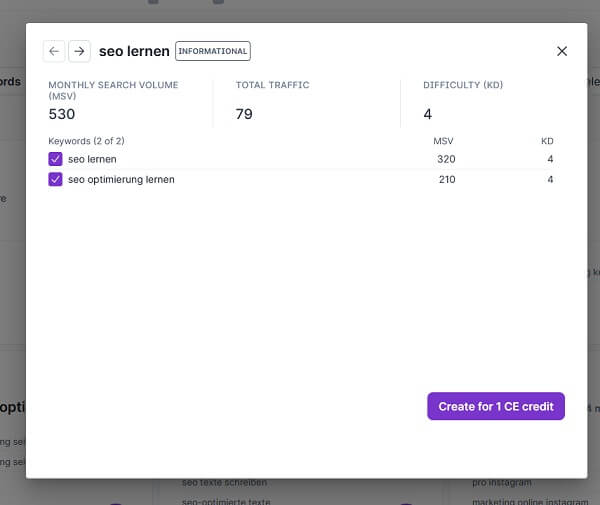
With just one click, you can transfer these keywords into your Content Editor and incorporate them into your content. If you consistently implement all clusters, you will automatically build topical authority. You can also view this topic cluster as a topical map.
By using the Content Planner, you won’t run out of ideas for new topics anytime soon. It’s important to note that the keyword difficulty is displayed on a scale from 0–10 instead of 0–100.
Here you can try the tool yourself and gain your own Surfer SEO experience.
Surfer SEO Audit Tool
With the SEO Audit Tool, you can create an SEO audit with just one click directly via the navigation. It not only shows how your content currently performs, but also how it compares to your competitors. At this point, you can also select which competitors should be included in the audit. 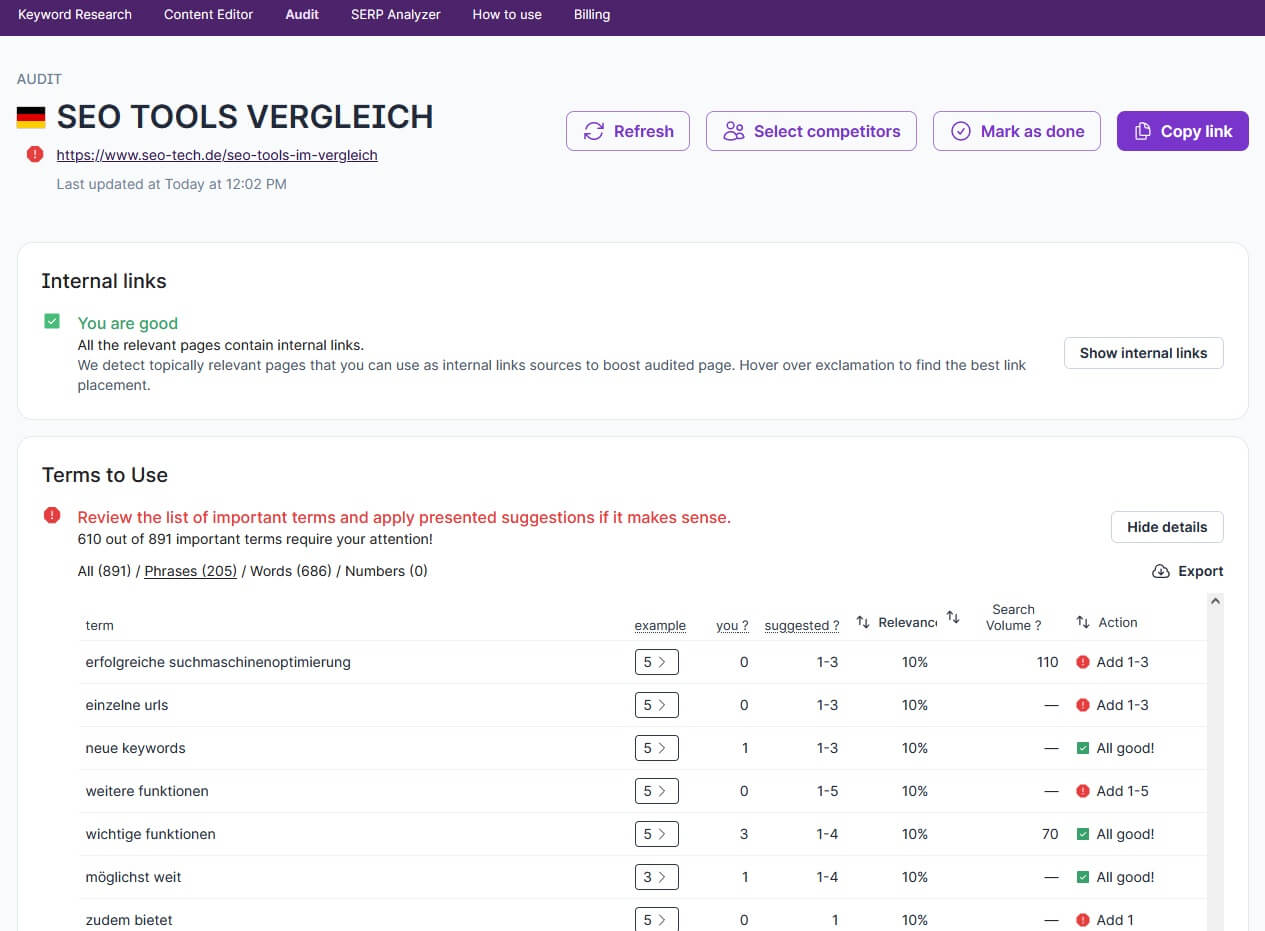
A helpful feature for performing quick analyses. A few more settings would be nice, but those may be added over time. It would also be useful if the Content Score were displayed here as well, including that of competitors. If you want more in-depth analysis at this point, you will need to use the SERP Analyzer.
Optimizing Existing Content
With the SERP Analyzer from Surfer SEO, this AI SEO tool gives you the ability to optimize your existing content. First, your content undergoes an SEO check.
After that, you receive suggestions for optimization improvements. The data comes directly from Google and the top-ranking URLs, making the recommendations data-driven.
Here you can try the tool yourself and gain your own Surfer SEO experience. 
The SEO Check
To start the SEO check and the on-page analysis, simply enter your desired keyword into the input field. You can then choose whether you want to view mobile or desktop results. You can also access NLP results, provided your account supports this feature. 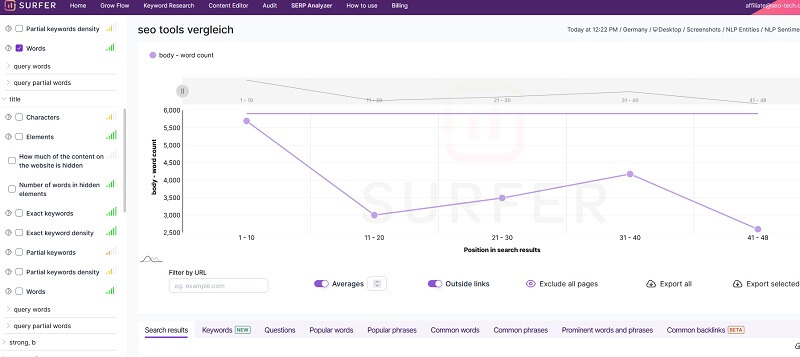
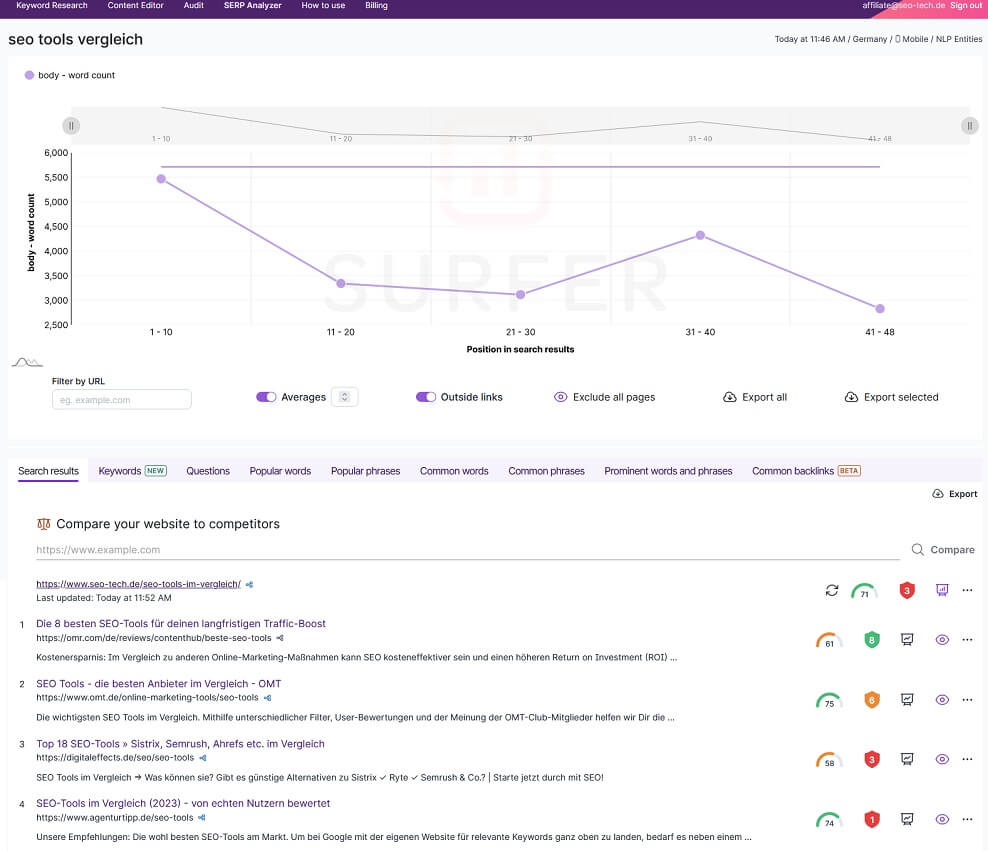
In the image, you can see the correlation between the SERP ranking of a URL and specific ranking factors. The number of words is automatically selected based on the SERP results.
This shows that articles ranking on page 1 of Google for the keyword “seo tools comparison” have an average of 5,500 words, while those on page 2 have around 3,000 words.
On the left side, you can see additional ranking factors that can also be displayed graphically when selected. These include:
- Number of words in the body
- Exact keyword density in the body
- Partial keyword density in the body
- Number of referring domains
- Number of characters in the title
- Keywords in alt descriptions
- Number of paragraphs
- Page speed
- Structured data
- Number of images used
Here you can try the tool yourself and gain your own Surfer SEO experience. 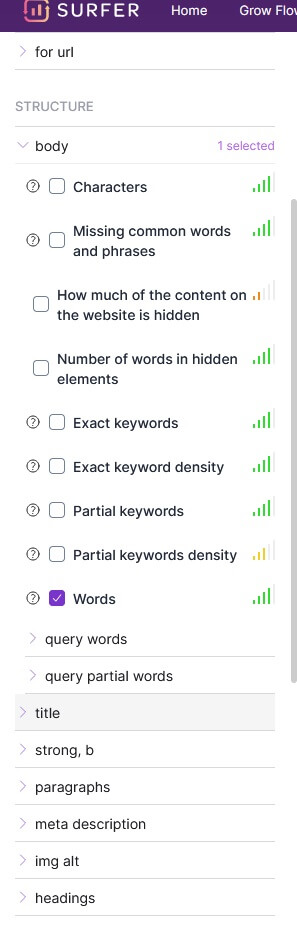
You can display exactly what you want to see in the chart, making it a really solid source of information. Below the chart, you’ll find the search results from the Google SERPs. If that feels like too much information, don’t worry. Surfer SEO makes it easy to create an audit.
This report will clearly show you what needs to be done to rank better. Simply enter the desired URL and click on “compare.” 
After clicking on “compare,” an SEO check is performed. The top 10 ranking pages are analyzed. If you want to know exactly what you need to do for a specific URL, meaning a clear action plan, you need to click on “Audit” in the navigation bar.
There, you’ll see in detail what needs to be done to carry out your on-page optimization, as shown in this example:
And if you want even more details, you can open the more detailed results view. There, you can see how many words each competitor has, so you can potentially add a few more words yourself. 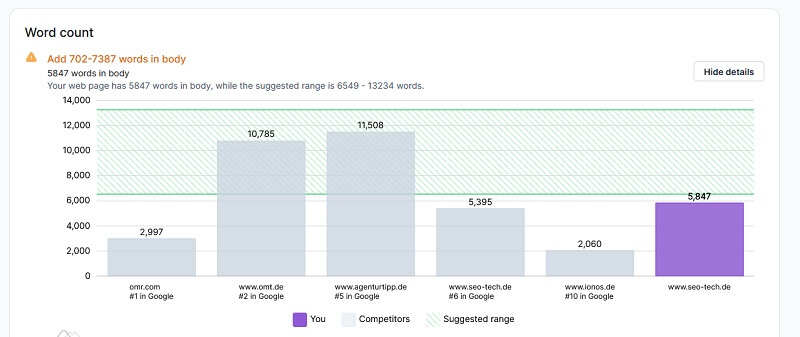
Here you can see that my article on this topic could use a few more words. Here you can try the tool yourself and gain your own Surfer SEO experience.
True Density
A very interesting feature is True Density, as it helps you evaluate and identify gaps in your content. This means it shows you whether certain words appear too often or too rarely. Surfer SEO suggests that relying on True Density is one of the easiest ways to optimize existing content. 
Here you can carry out your on-page optimization and check what you should add or remove.
- Everything marked with “all good!” and green is fine, you don’t need to do anything.
- Yellow warnings indicate minor issues or adjustments that should be made.
- Red indicators show major issues where action is required.
You can also prioritize the list by clicking on “Relevance.” Thanks to the clear guidance, you know exactly what to do, and everything is kept simple and easy to follow.
Missing Common Backlinks
Backlinks are still an important factor for good rankings. To help with this, the tool includes a dedicated feature. It allows you to check which backlinks your competitors have that you don’t yet have.
This shows that Surfer SEO also supports you in identifying potential backlink opportunities and where you might be able to acquire additional links. 
So, there are no missing backlinks here. In the audit, you can also see which backlinks are most commonly shared. 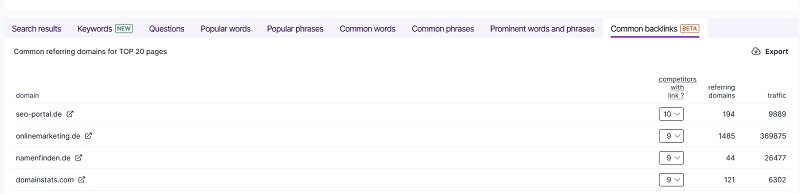
Creating New Content with Surfer SEO
If you want to create new content with the Surfer SEO tool, you can do so using the Content Editor. The Content Editor provides you with a clear direction and structure for your content.
Here you can try the tool yourself and gain your own Surfer SEO experience.
If you want, you can generate a link and send it to your writer or copywriter, so they can create the blog content while following the SEO recommendations provided by the tool. These recommendations include, among others:
- Keyword usage
- Content length
- Structure elements and their quantity
- Images
- and more
These clear guidelines significantly reduce the amount of work required. Simply enter your keyword, select the location or country, and get started. The tool will then analyze the top 10 competitors, and once the analysis is complete, the results will be displayed: 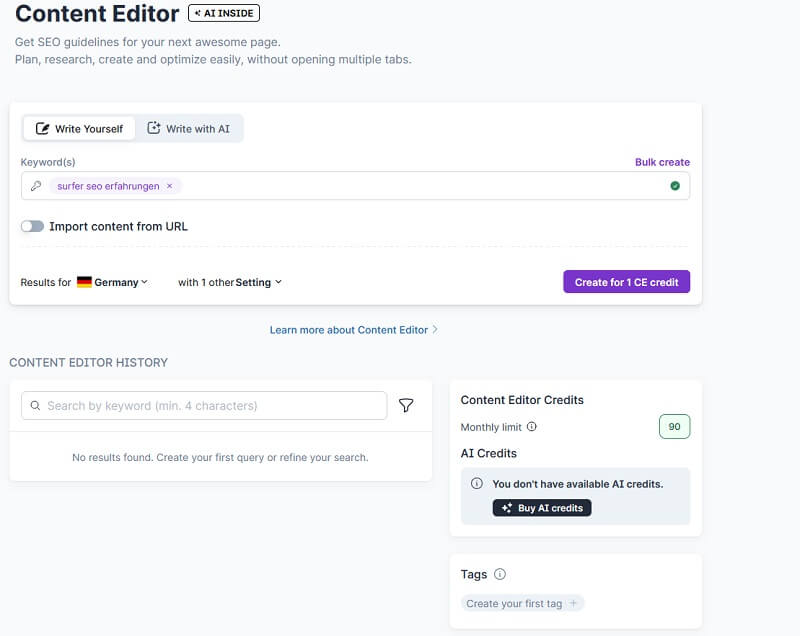
On the right side, you can see the guidelines and what still needs to be done, such as:
- Number of words
- Images
- Bolded words
- Content structure
- Headings
- Paragraphs
- Important terms you should include
- Other relevant terms
- Important questions you should cover
On the left side, you have your text editor, where you can write your content. As you add suggested words, the numbers will change and may turn green, yellow, or red if you use them too often. You should aim to reach the recommended number shown.
If you want to make adjustments, simply click on the gear icon and modify the competitors. You can also adjust the structure, terms, word count, questions, and more.
Here you can try the tool yourself and gain your own Surfer SEO experience.
Content Length
When you receive the analysis and a suggested average word count, keep in mind that this is just an average. You should aim to create content with a similar length. The length of your text also affects the density of phrases and keywords within it.
Check Keywords
The keywords suggested by the tool are based on your main keyword and its semantic similarity. That’s why it’s important to include these words and keywords in your content.
If there are words you don’t want to use because they don’t fit your content, you can simply click on them and remove them from the list. After all, only relevant terms should be included.
Select Questions
Questions are important because they can help you appear in the “People Also Ask” section on Google. Users frequently search in the form of questions, so they should not be missing from your content. Choose the most relevant questions for your topic and incorporate them into your article.
Add Notes
If you want to add notes for yourself or your writers, such as important instructions or things to consider during content creation, you can do so here. By clicking on “Final Customization,” you complete this step.
These notes are especially useful if you work with external writers who don’t have (or need) their own Surfer SEO account.
Google Docs Integration
If you use Google Docs, you can integrate Surfer SEO using a Google Chrome extension. This allows you to use the Content Editor directly inside Google Docs.
This makes content optimization even easier and more efficient. In the following video, these features and more are explained in detail, helping you perform strong on-page optimization with this software.
Here you can try the tool yourself and gain your own Surfer SEO experience.
Surfer Grow Flow
Another very exciting feature is Surfer Grow Flow. It essentially provides you with personalized recommendations to help improve your Google rankings. Grow Flow analyzes not only your own website but also your competitors within your niche to identify optimization opportunities.
To use this feature, you need to connect your domain (Grow Flow) with Google Search Console. After that, Grow Flow will send you weekly, AI-based yet personalized tasks and insights that you can implement to improve your performance. 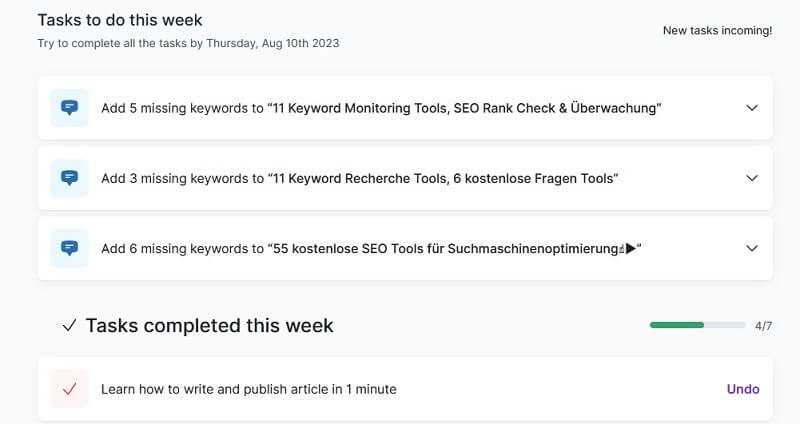
With Grow Flow, Surfer SEO offers a powerful feature that helps you improve your content and optimize it for better SEO rankings in several ways. On the one hand, Grow Flow suggests potential and relevant keywords that you can use in your content or replace your current keywords with.
These suggested keywords are carefully tested and aligned with the latest market trends to ensure your content remains fresh and up to date. In addition, Grow Flow supports you with your internal linking strategy. It identifies pages that rank well in search results and shows you where you can link your content to improve your rankings in Google.
Optimizing your internal linking structure is crucial for increasing the relevance and visibility of your content. Beyond on-page optimization suggestions, Grow Flow also provides new content ideas. It recommends interesting topics you could write about next.
This makes the feature a great addition for any content creator. With these inspiring suggestions, Grow Flow gives you new input for future content and helps you build a strategic and successful content marketing strategy. And the internal linking recommendations complete the whole package.
Here you can try the tool yourself and gain your own Surfer SEO experience.
Surfer Experience: Who Is the Surfer SEO Keyword Tool Suitable For?
In my opinion, this tool is suitable for anyone who works with SEO and, above all, wants to create content that can actually be found in search engines. And that’s probably everyone who writes content for their website or blog.
Plugins like Yoast, RankMath SEO, or All-in-One SEO usually provide only very basic and general information. Often, these suggestions are not even fully accurate, and more importantly, they don’t offer specific recommendations related to the target keyword and related terms.
The tips provided by Surfer SEO, on the other hand, are highly specific and individualized. This significantly increases your chances of being found on Google.
Here you can try the tool yourself and gain your own Surfer SEO experience.
Does Surfer SEO offer access for writers?
Yes. If you work with external writers or copywriters who don’t have their own *Surfer SEO account, you can simply create the analysis and share the Content Editor link with them. This works easily for each analysis and article individually, so a separate account is not required.
Keyword Surfer Chrome Extension Tool
Keyword Surfer* is an outstanding Chrome extension that is 100% free. Once downloaded and installed, it works instantly and provides extensive capabilities. When you enter a search query into Google, Keyword Surfer* performs a free SEO check directly on the search results page.
You immediately get data in your browser such as monthly search volume, related keyword suggestions, visibility metrics, and similar search queries. The big advantage: all this information appears directly inside Google search results, no need to log into another tool.
In addition, Keyword Surfer* provides further metrics for each individual search result. With this data, you can identify strong keywords, estimate their difficulty, and plan your content accordingly. Every Google search you perform becomes a source of valuable SEO data. This includes:
- search volume for your main keyword
- related keywords with volume and similarity score
- estimated traffic for domains ranking in the top results
- related search queries with their volumes
- word count of top-ranking pages
- number of exact keywords used on those pages
- and the cost per click (CPC) for your main keyword
With this amount of data, Keyword Surfer* is a powerful on-page SEO tool and delivers an excellent user experience. It’s a highly valuable resource for optimizing your website and improving the performance of your content. 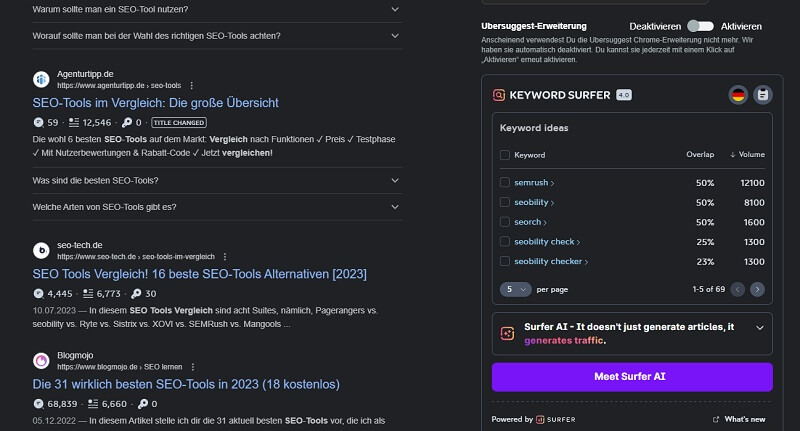
In addition, the Content Editor is now integrated, making content creation much faster and easier. Really powerful. With the free Keyword Surfer, you get all the key metrics, including word count and all relevant phrases. You can then use this data directly, from the Google search results page.
This is an excellent way to test Surfer SEO for free. Keyword Surfer is a really solid choice as a Chrome extension. You get a lot of valuable information for free that you can use directly from the Google SERPs for your SEO checks.
Here you can try the tool yourself and gain your own Surfer SEO experience.
Integrations
To make the software even more powerful, there are additional integrations available. For example, you can integrate it directly into WordPress and use the Content Editor right inside WordPress. If you want, you can also connect it with SEMrush or Jasper and use it together. 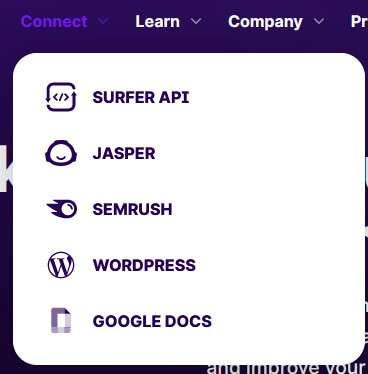
Surfer SEO Pricing and Costs
You can get the tool starting from 69 US dollars per month. There are four different plans, which mainly differ in terms of the number of keyword research queries or the maximum amount of content you can optimize. 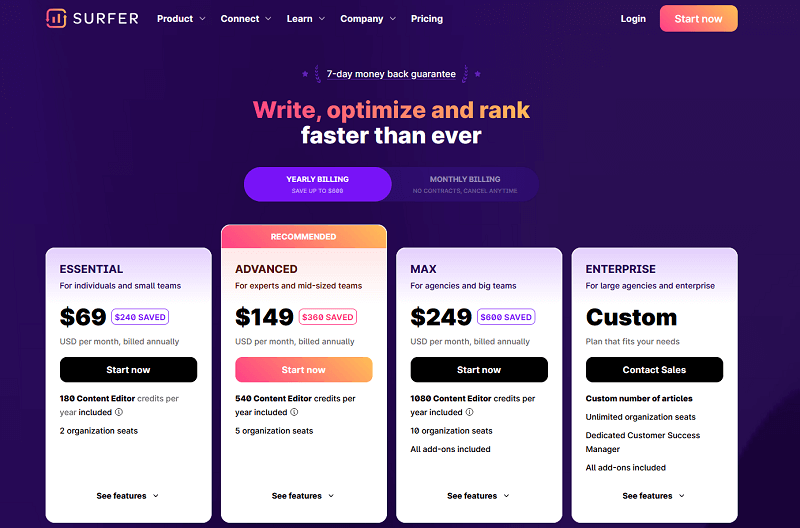
Grow Flow, Audit, and SERP Analyzer should be considered add-ons and can be booked separately, unless you choose the MAX plan, which already includes all add-ons. 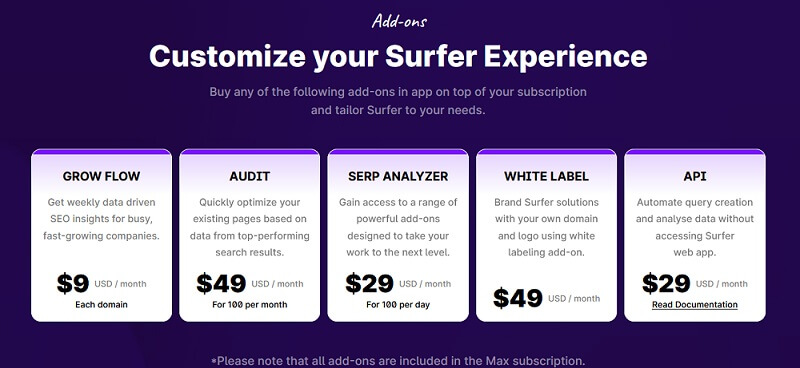
If you want to have articles created directly by Surfer AI, it currently costs 29 US dollars. In my opinion, this is too expensive at the moment and the price-performance ratio is not worth it.
The good thing is, you can test everything at your own pace, as you have a 7-day money-back guarantee. This allows you to practically try it out for free.
Here you can try the tool yourself and gain your own Surfer SEO experience.
Surfer SEO Experience & Test
Let’s come to the end of my Surfer SEO experience. As you’ve seen in this *Surfer SEO review, the tool can do a lot. It helps you immensely with analyzing and optimizing your content.
It’s also very in-depth, and the insights are based on real data directly from Google search results. It’s not just a WDF*IDF analysis, but a more advanced NLP-based analysis.
This allows you to take a closer look at the URLs ranking ahead of you and optimize your content accordingly. That way, you know exactly what to adjust and where to improve in order to climb higher in the rankings. So overall, a clear recommendation!
Here you can try the tool yourself and gain your own Surfer SEO experience.