
There are many different SEO tools and online marketing software solutions on the market. Because of this, it is often not easy to choose the right one. And once you have chosen a tool, switching to another one later is not always quick or easy.
After all, you get used to the software, and your data and historical insights are already stored within that SEO tool.
However, it is still important to occasionally get an overview of the market and the available tools. That’s exactly why I want to share my Mangools experience from several years of using it (since 2018).
In fact, Mangools combines five different tools into one suite: KWFinder, LinkMiner, SERPChecker, SiteProfiler, and SERPWatcher.
In this Mangools review, I’ll share my personal experience with the Mangools SEO tool suite.
Test the tool by yourself for free! Plus activate your coupon (already in the link integrated)
Mangools Review: The SEO Tool Suite with Multiple Tools
Mangools is a collection of several SEO tools that may appear simple, but are extremely useful in practice. Especially when it comes to finding strong keywords with attractive search volume and useful metrics, KWFinder is outstanding, but more on that later.
With this software, you get access to the most important SEO data and key metrics. You can then use this information to build and optimize the strategy and content for your website.
The usability is excellent. The tools are easy to use, and the interface, fields, and design are intuitive and largely self-explanatory.
Mangools offers several different tools that you can use for various aspects of search engine optimization, all included within the suite without additional costs. Each tool can essentially be viewed as a standalone SEO tool, and the overall feature set is quite impressive.
Test the tool by yourself for free! Plus activate your coupon (already in the link integrated)
KWFinder Review: Keyword Research Tool Test
The KWFinder tool is the most frequently used and probably the best-known tool within the Mangools suite. It’s also the feature I personally use the most when working with Mangools to find relevant keywords.
KWFinder is a very powerful keyword research tool from Mangools that is extremely easy to use while still providing a wide range of valuable keyword data.
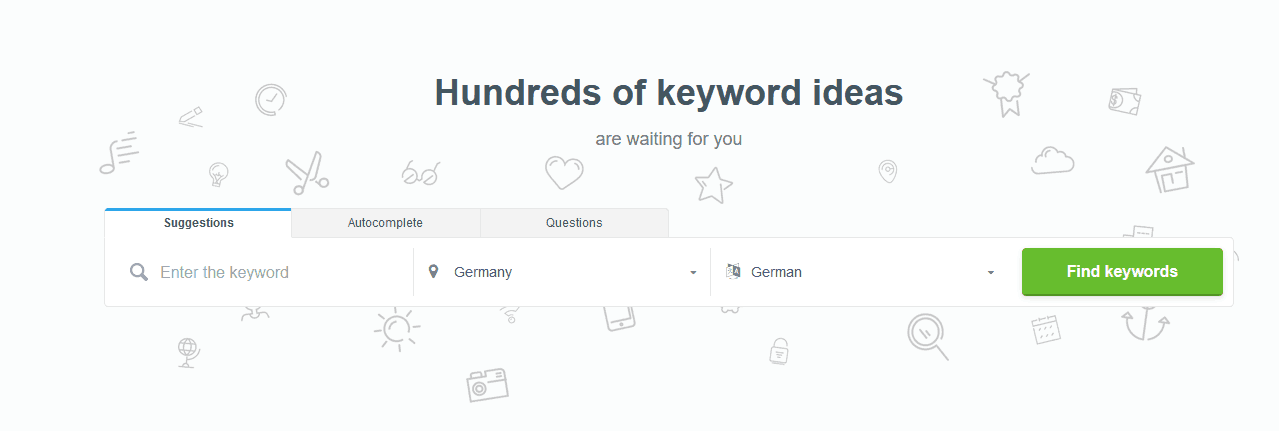
To start a search in KWFinder, you simply enter the country, language, and the keyword you want to analyze.
You can also choose between keyword suggestions, autocomplete suggestions, or question-based keywords, and then start the research process.
After the KWFinder software has processed your request, you will see the results for the individual keywords. Among other things, you will see various keyword suggestions (in this example for the main keyword “aquarium”).
Next to each keyword, several important metrics are displayed. These include the trend, the average monthly search volume calculated over 12 months, the average CPC, the competition level in PPC (AdWords), and the Keyword Difficulty (KD).
You can also see how the monthly search volume has changed over the past 12 months.
In KWFinder, the keyword difficulty is categorized using different colors and numerical values. The lower the number, the easier it is to rank for that keyword.
As the difficulty changes, the color indicator also changes. Green keywords, for example, indicate that ranking for those terms is generally easier.
On the right side, the monthly search volume is broken down month by month, allowing you to see whether there is a seasonal trend and which months have the highest search demand.
In addition, KWFinder shows the top-ranking domains for the keyword, along with useful information such as Domain Authority, the authority of the ranking URL, and other important metrics.
This allows you to see the most important SEO data at a glance, making the tool also very useful for competitor analysis.
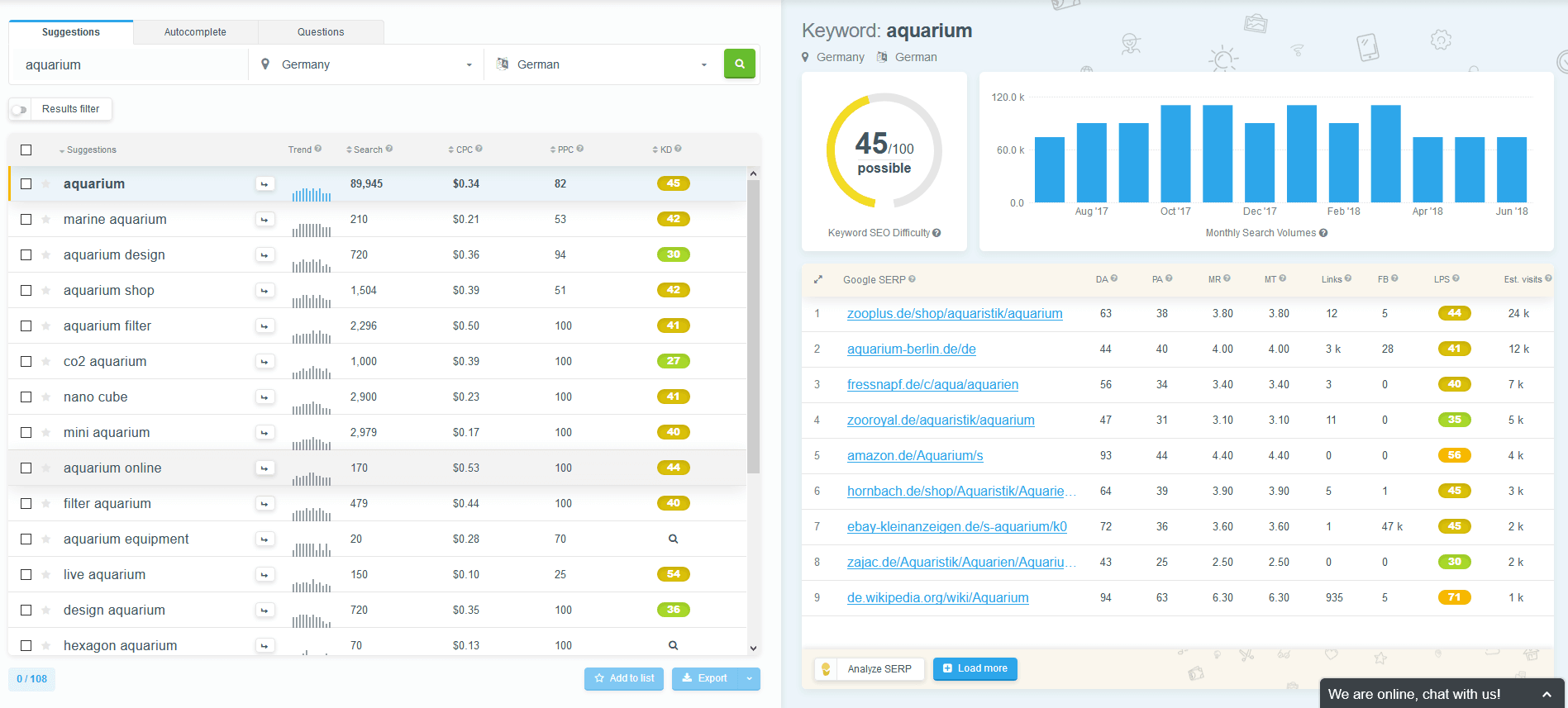
If you hover your mouse over the small question mark icon in KWFinder, you will see a detailed explanation of the respective metric. You can also view the domain directly by clicking on the corresponding link.
As you can see, KWFinder is very simple to use, yet extremely helpful. This keyword research tool can support you significantly when developing your content strategy and creating new content.
If you want to export the information about the keywords you found in KWFinder, you can easily export the keyword lists.
You have two export options: you can either copy the keywords to your clipboard or export them as a CSV file. This is particularly useful when preparing your content planning afterward.
Test the tool by yourself for free! Plus activate your coupon (already in the link integrated)
KWFinder is one of the best tools for keyword research. It allows you to find highly relevant and profitable keywords, as well as questions that can help you rank better in Google.
Keyword research is often underestimated, yet it forms the foundation for everything that follows.
If the search volume is too low or too high, the wrong keywords and questions are chosen, or the wrong metrics are analyzed, your website and the specific URL will not appear in Google search results—and the work you invested will have been in vain.
Fortunately, KWFinder helps you quickly and easily identify profitable keywords with attractive search volume using a wide range of useful metrics. This allows you to improve your rankings in Google and other search engines.
Only then can you present your high-quality content to users and potentially earn backlinks organically.
Mangools SERPWatcher Review: Keyword Monitoring Tool Test
To access SERPWatcher, simply switch between the tools in the top-left menu and select SERPWatcher. SERPWatcher is a keyword monitoring tool.
With it, you can track the keywords and search terms you have defined and want to rank for.
This allows you to quickly see whether your keyword rankings have improved or declined. The tool displays these changes clearly and precisely. Rank tracking is extremely important, especially when you want to understand how your SEO work has impacted your rankings.
If your rankings improve, the results are shown in green, and if they decline, they appear in red. Based on these changes, you can adjust your on-page optimization and SEO strategy accordingly.
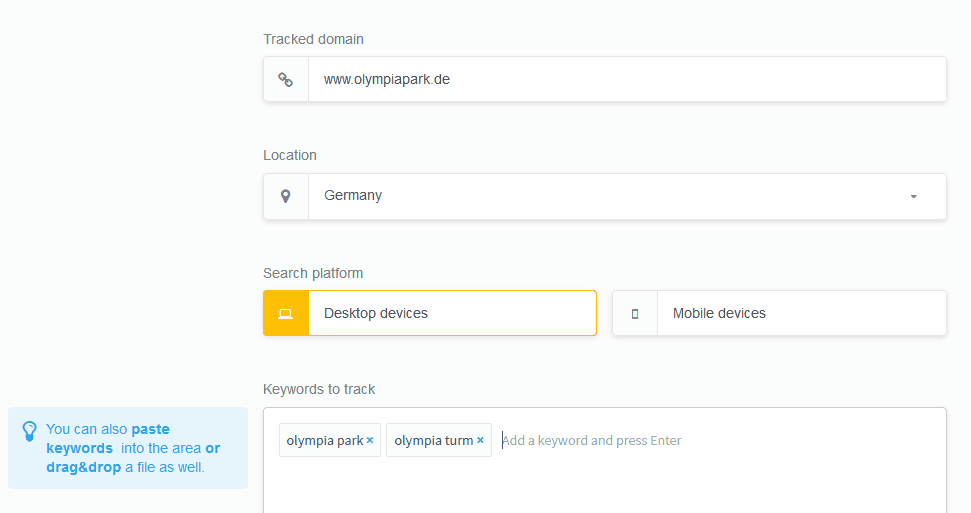
To start tracking, simply enter your keywords and add them to the monitoring system. Then select the corresponding domain and the platform (desktop or mobile devices), and the keyword monitoring can begin.
You will see the first results relatively quickly, but the historical data will naturally build up over time as more data points are collected.
With SERPWatcher, you can see which keywords have made the biggest ranking movements, either upward or downward. The tool also shows the estimated traffic, meaning the estimated number of visitors those keywords could generate.
Just like with KWFinder, you can also export the data in SERPWatcher and use the information elsewhere if needed.
Test the tool by yourself for free! Plus activate your coupon (already in the link integrated)
Mangools LinkMiner Review: Backlink Analysis Tool Test
One tool that I find particularly impressive is LinkMiner. With this tool, you can analyze your own backlinks as well as those of your competitors.
This makes it easy to discover new opportunities for your off-page SEO optimization. The tool is also extremely easy to use. The input interface at the beginning will already look familiar if you have used KWFinder before.
Simply enter the domain you want to analyze, and the tool will quickly find the backlinks for that website. This also allows you to analyze the backlink profiles of your competitors, which is a very useful feature.
Once the backlinks for the selected domain have been analyzed, several important metrics are displayed.
For example, you will see:
- the link source
- CF (Citation Flow)
- TF (Trust Flow)
- the number of external links
- Facebook shares
- the Alexa Rank
Of course, the tool also shows the linked URL and the anchor text used for the backlink.
In addition, LinkMiner indicates how strong the linking domain is. This is displayed on the far right using the LS (Link Strength) metric.
Further information such as CF, TF, the number of referring IP addresses and domains, and the total number of backlinks can be found in the top-right section of the interface.
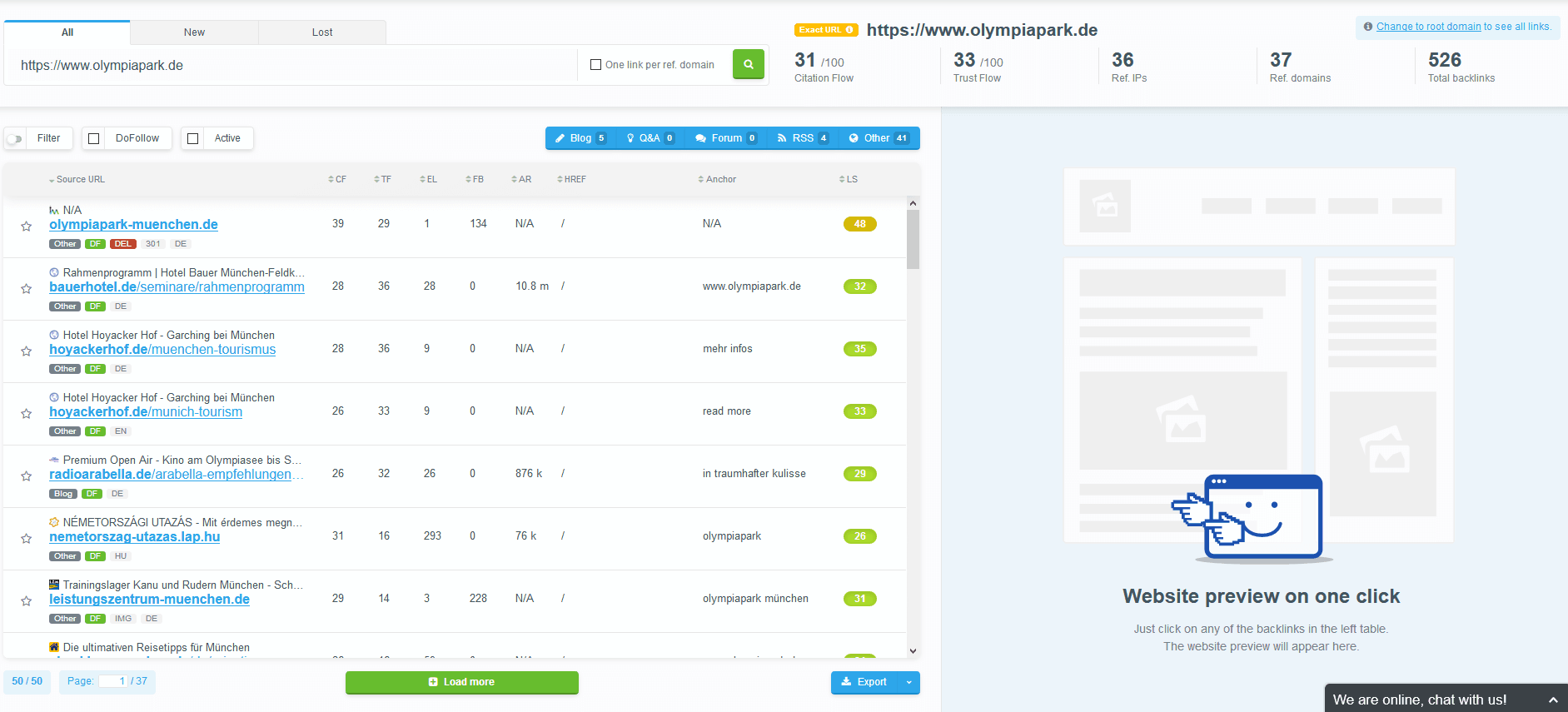
Additionally, you can filter the results by various criteria. Within the different categories, you can apply minimum and maximum filters to refine the results.
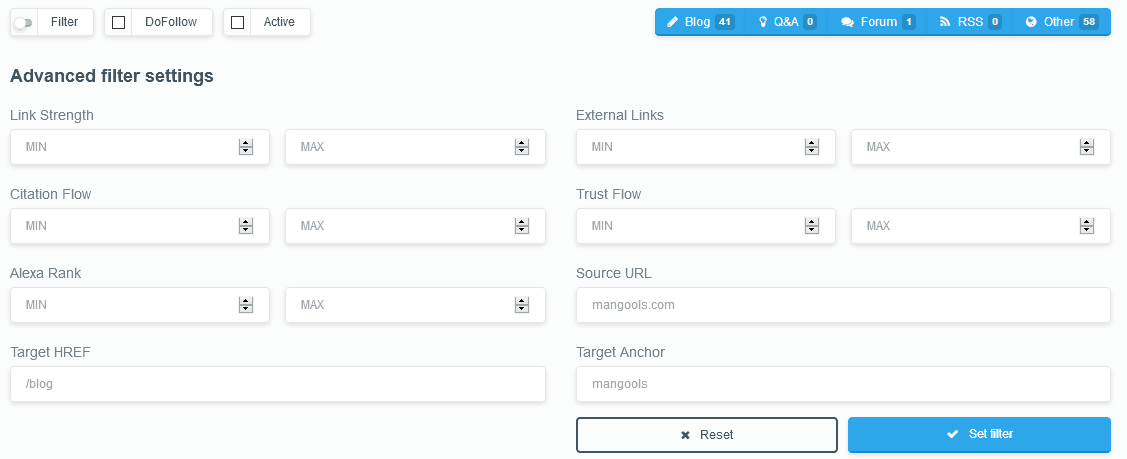
You can also see the different types of sources. This means you can identify whether the backlink comes from a blog, RSS feed, forum, Q&A platform, or another type of website.

Here as well, you can copy the information from the SEO tool to your clipboard or export it as a CSV file. By clicking on a referring URL, you can go directly to that page and examine it in more detail.
This makes it a helpful tool for finding new backlink opportunities and using them for your link-building strategy, which can help improve your rankings in Google and other search engines. Mangools can support you with this process.
You can also import your existing backlinks into the SEO tool’s backend in order to monitor them there. This means you no longer need to maintain separate lists, as you can track everything directly through Mangools LinkMiner.
Test the tool by yourself for free! Plus activate your coupon (already in the link integrated)
Mangools SERPChecker Review: Displaying Search Results
The SERPChecker is a tool you can use to quickly view the search engine results pages (SERPs).
If you’re thinking, “I can just do that with a Google search,” you’re only partly right. The SERPChecker offers much more than a simple search result view.
It not only shows which domains rank for the keyword you entered, but also provides several additional insights within the SERPChecker.
For example, you can see how strong the backlink profile of each ranking URL is, including metrics such as DA (Domain Authority), PA (Page Authority), CF (Citation Flow), TF (Trust Flow), and more.
This makes the SERPChecker a very useful and practical tool for everyday SEO analysis.
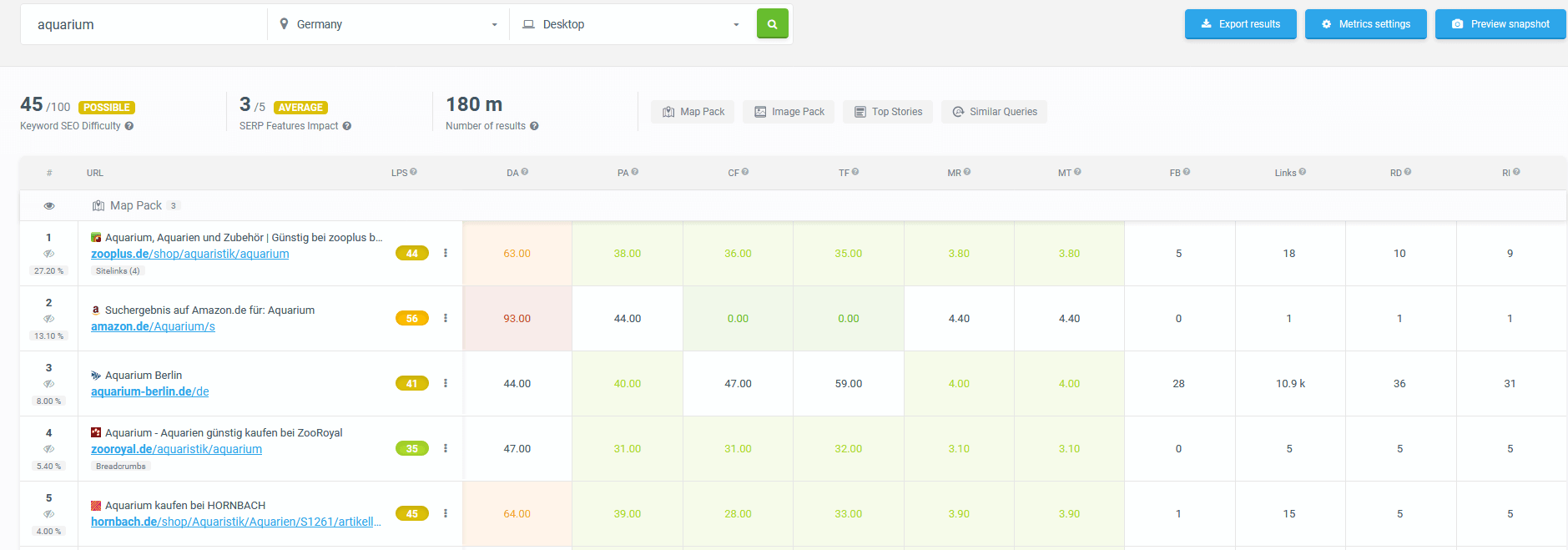
These are all important pieces of information because they allow you to build and refine your strategy based on real data.
Through this analysis, you can identify potential backlink sources that might be valuable for your website and determine which ones could be most relevant to your strategy.
Overall, it’s a very useful tool for quickly checking the SERPs and performing a more detailed SERP analysis.
Test the tool by yourself for free! Plus activate your coupon (already in the link integrated)
Mangools SiteProfiler: Quick Analysis of a Website
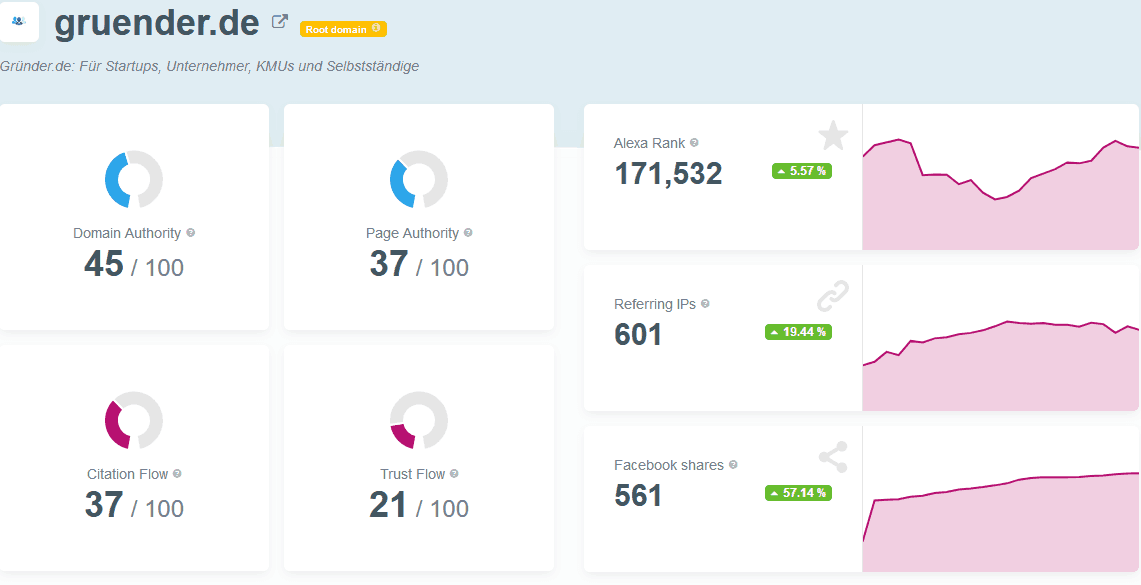
With SiteProfiler, you can analyze your own website or that of a competitor with just one click using the most important SEO metrics.
The SiteProfiler immediately shows key data such as Domain Authority, Page Authority, Citation Flow, Trust Flow, the backlink profile, the most popular and strongest URLs, and much more.
This allows you to perform a quick website analysis and instantly receive the most relevant insights and characteristics of a domain.
This can be particularly useful if you are planning a link exchange or considering purchasing a website project. The SiteProfiler feature helps you evaluate such opportunities quickly and efficiently.
Mangools Pricing
Especially after the Google Keyword Planner switched to displaying only approximate search volumes, the demand for SEO and keyword research tools increased significantly, particularly for KWFinder.
The reason was that the exact search volume data in the Google Keyword Planner was no longer accessible unless you were running Google Ads campaigns with a certain budget.
Since not everyone can or wants to spend money on ads, SEO tools like KWFinder became a popular alternative. As a result, pricing for such tools was adjusted, especially since additional tools were added to the Mangools suite.
You can test Mangools for free for 7 days. After that, the tool becomes paid.
The pricing plans are fairly reasonable and start at €29.90 per month with the Basic plan.
With this plan, you can:
- perform 100 keyword searches every 24 hours with 200 suggestions per search
- run 100 SERP lookups
- track 200 keywords
- analyze up to 100,000 backlinks every 24 hours
The Premium plan, starting at €39.90 per month, allows you to:
- perform 500 searches per 24 hours with 700 keyword suggestions per search
- run 500 SERP lookups
- track 700 keywords
- analyze 500,000 backlinks every 24 hours
- use 3 simultaneous logins
If you run an agency or need a larger plan, you can choose the Agency package, which costs €79.90 per month.
With this plan, you can:
- perform 1,200 keyword searches per 24 hours, each with 700 suggestions
- run 1,200 SERP lookups
- track 1,500 keywords
- analyze 1.2 million backlinks per 24 hours
- use up to 10 simultaneous logins.
Test the tool by yourself for free! Plus activate your coupon (already in the link integrated)
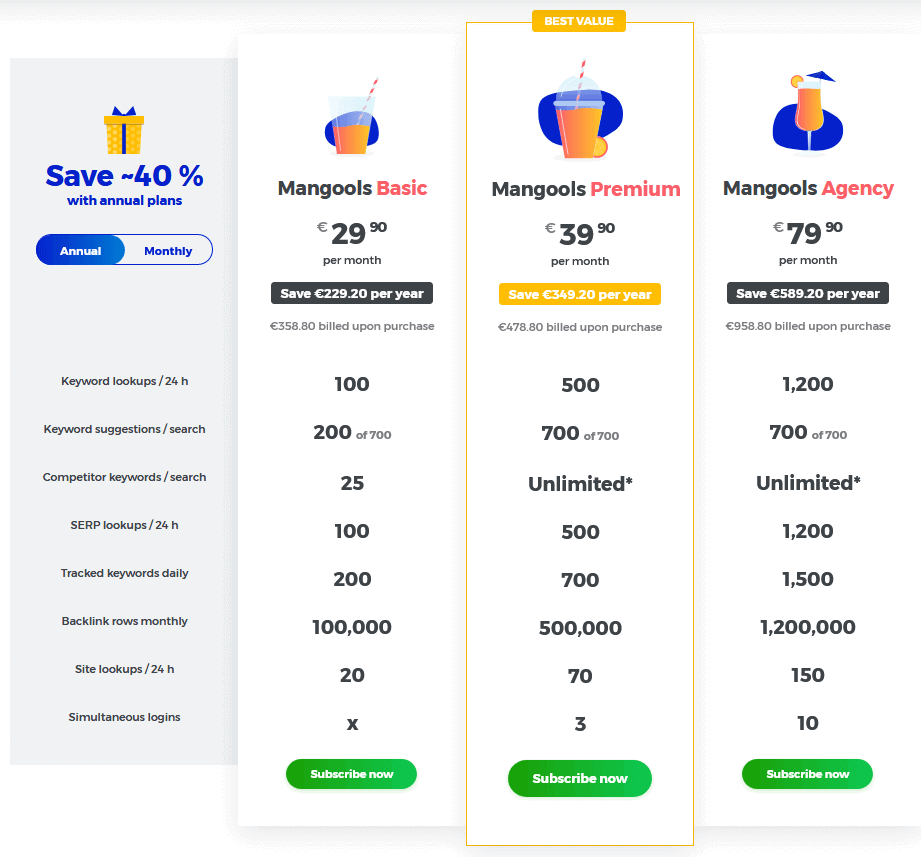
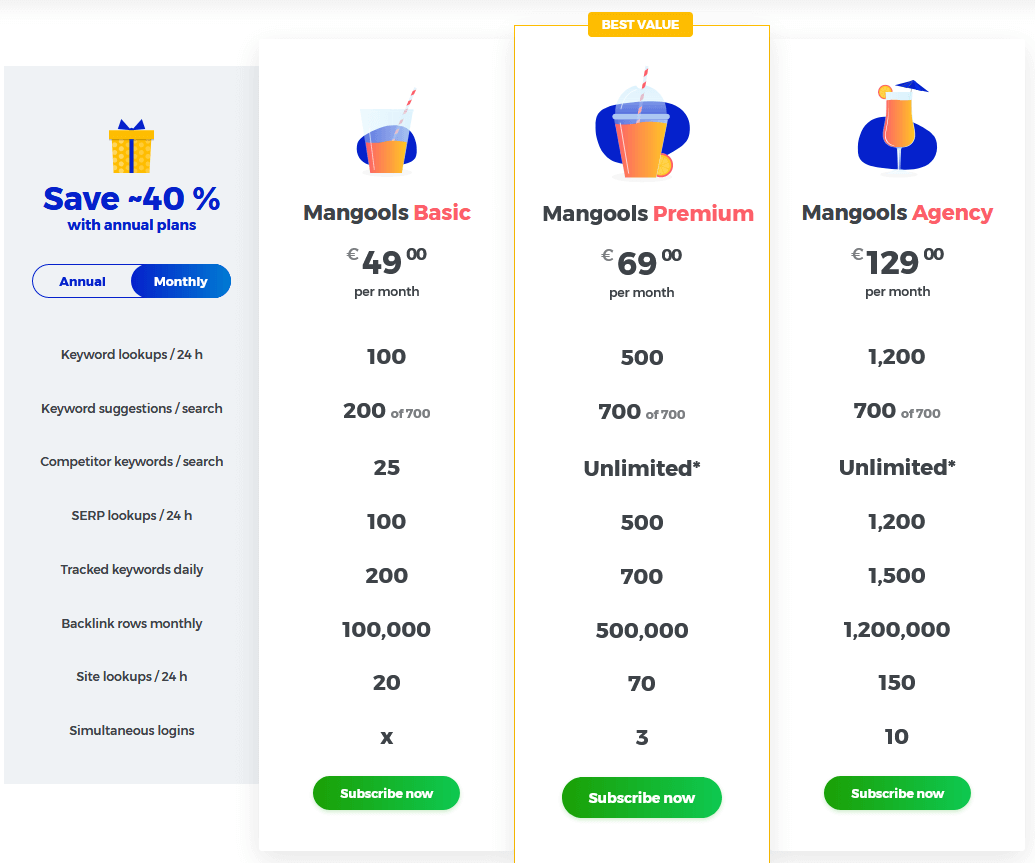
The prices shown in the image above are the valid prices in euros when choosing annual billing.
If you select monthly billing, which allows you to cancel on a monthly basis, the prices are slightly higher. With annual billing, you save up to 40% compared to the monthly option.
With monthly billing, the prices are:
- Basic plan: €49 per month
- Premium plan: €69 per month
- Agency plan: €129 per month
As you can see, if you like the SEO suite, it makes sense to switch to annual billing, as this allows you to save a significant amount of money.
Test the tool by yourself for free! Plus activate your coupon (already in the link integrated)
Who Is This SEO Tool Suitable For?
The Mangools SEO suite is ideal for anyone who wants to perform solid and accurate keyword research. It can also be very useful for Google Ads campaigns.
The tool allows you to conduct quick keyword research backed by reliable and meaningful data—which is essential for effective SEO analysis.
If you currently struggle with keyword research, your existing SEO software, or the quality of the data you receive, this tool may be a great alternative for you.
You can group the discovered keywords and use them for Google Ads campaigns, content creation, or optimizing your WordPress website, for example.
KWFinder provides numerous interesting and valuable keywords that you can use for your marketing strategy and search engine optimization.
Whether you use the entire suite or just KWFinder, the tool helps you identify profitable keywords for your projects.
The best approach is to try it yourself with a free Mangools trial and see if it fits your workflow.
You will probably spend most of your time using KWFinder and conducting your keyword research with it.
Test the tool by yourself for free! Plus activate your coupon (already in the link integrated)
Mangools Review and Test Report: Final Verdict
This brings us to the end of my Mangools review. My overall experience with the tool, its software, and the individual modules has been consistently positive.
It provides very useful and insightful information, avoids unnecessary complexity, and offers a clean UI and user-friendly experience. The tool is simple to use and easy to understand.
The data provided is relevant and especially valuable for keyword research. In particular, KWFinder is an excellent tool for discovering and analyzing keywords.
It’s no coincidence that KWFinder is often considered one of the best keyword research tools available. With its simple and clear metrics, it helps you identify profitable keywords and questions, along with their search volume and competition level, making it easier to rank higher in Google search results.
This allows you to expand search engine optimization as a marketing channel by finding keywords that you can effectively optimize your content for. For this purpose, KWFinder is an excellent tool.
The monitoring features and additional tools are also a strong advantage. In particular, LinkMiner is very useful, as it helps you discover potential backlink sources for specific keywords and use them to strengthen your SEO strategy.
Overall, I believe the price-performance ratio is very good, especially if you choose the annual billing option. Many users rely on the SEO software mainly for KWFinder and its keyword research capabilities alone.
Test the tool by yourself for free! Plus activate your coupon (already in the link integrated)